Traces
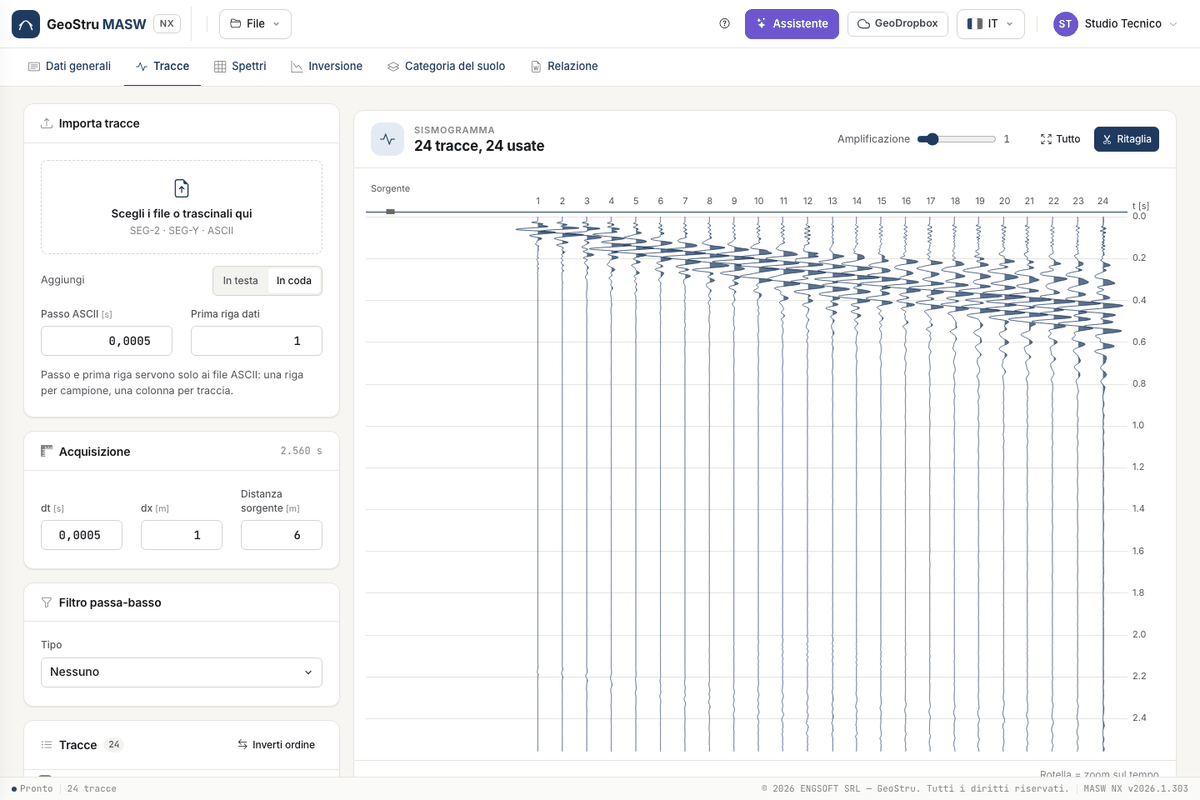
The Tracce tab prepares the data that enter the spectrum.
Importing
Drop files on the box or choose them: SEG-2 (.sg2, .seg2, .dat), SEG-Y (.sgy, .segy), SU (.su), Ambrogeo (.dta), SARA DoReMi (.drm),
Dolang and ASCII (.txt, .asc, .csv). Choose whether traces go first, last, interleaved or summed with
those already loaded.
An ASCII file does not state the sampling step: enter the ASCII step and the first data row. Each row is one
sample and each column one trace, separated by ;, tab, comma or spaces.
SEG-Y amplitudes
IBM floating-point samples (code 1) are converted correctly. The desktop version read them as IEEE.
Acquisition
Set dt (sampling step), dx (geophone spacing) and the source distance from the first geophone. The sampling step sets the Nyquist frequency; dx sets the spatial aliasing limit.
The seismogram
One column per geophone, time downwards, positive lobes filled. Amplification enlarges the oscillations, the mouse wheel zooms on time, and Tutto (All) restores the full view. Each trace is normalised to its own maximum.
Trace list
For each trace you can:
- clear Use in spectrum: the trace stays in the project but leaves the calculation. The spectrum accounts for the real position of the remaining geophones;
- invert polarity, move up, move down, delete;
- with Inverti ordine (Reverse order) flip the whole spread, if the source was on the other side.
Cropping and filter
Ritaglia (Crop) draws the useful zone on the seismogram: drag the polygon and apply. Outside the zone the signal fades over 20 samples, with no step. Removing the crop restores everything.
The low-pass filter is Butterworth or Chebyshev: choose cut-off and attenuation. It is a single pass, so it delays the signal slightly, as the desktop version does.
Filter, crop and polarity do not touch the samples as read: they can be removed at any time. If you change them after computing, a strip tells you the spectrum must be redone.
Found an error on this page? Let us know or open a Pull Request.