Quick start (5 minutes)
In five minutes you'll go from opening the app to reading the checks for a nailed anchor. Open nx.geostru.ai/srs and follow the steps.
Start from an example
The fastest way to get familiar with the app is to load an example
project: File → Open and pick one of the .srs files described in
Example projects. The form fills itself and you can
calculate right away.
1. Slope
In the PROJECT sidebar, section Slope, enter the slope inclination α, the overburden thickness S, the unit weight γ_col, the friction angle φ_col, the drained cohesion c'_col and the dimensionless seepage-flow thickness m (0 = no water table, 1 = water table at ground level). See Slope and substrate.
2. Substrate
In Substrate choose Soil or Rock and set the bond stress (ad_soil or ad_rock): a dropdown suggests typical values by lithology, or enter it manually. For soil also add the injection-mode coefficient α_iniez. See Slope and substrate.
3. Seismic coefficient (optional)
If the site is seismic, in Seismic parameters set the horizontal seismic coefficient K_h. Leave it at 0 for a static-only check. See Seismic action.
4. Calculate FS₀
In Design parameters, step 1, press Calculate FS₀: SRS computes the slope's safety factor before the intervention, using only the slope and substrate data entered so far.
5. Set FS_des
In step 2 enter the design safety factor FS_des you want the intervention to reach (it must be greater than FS₀).
6. Nail, grid and mesh
In Anchors pick a nail from the catalog (GEWI or TITAN) or enter the parameters manually: bar diameter φ_b, yield strength f_yk, drilling diameter D_f, length L_a, inclination β, grid spacing i_x/i_y, mortar resistance R_ck and bond coefficient η₁. In Mesh set the mesh size, wire diameter and the tension/punching resistances. See Nails and anchors and Facing mesh.
7. Calculate
In step 3 press Start (or the Calculate button at the top). The calculation consumes NX credits.
8. Read the checks
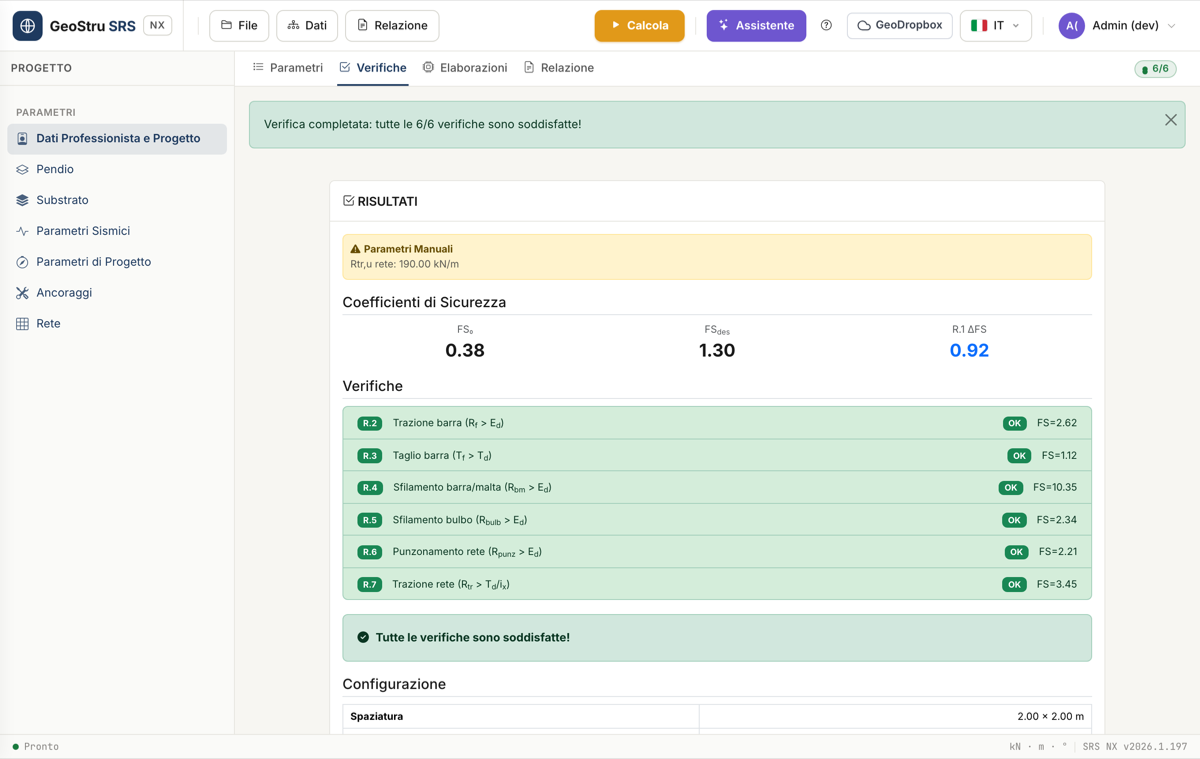
The Design checks tab opens automatically and shows FS₀, FS_des, the achieved increase ΔFS, and the outcome of the six checks R.2–R.7 (bar tension, bar shear, bar/mortar slip, bulb slip, mesh punching and mesh tension), plus the number of anchors needed per 100 m² of mesh. See Design checks.
9. Report
From the Report menu at the top export the calculation document in
Word, DOC or PDF; from the File menu save the project
(.srs). See Report and exports.
The AI assistant
The Assistant button at the top sets up an entire project from a plain-language description, fetches the seismic coefficient for a location, and explains the checks results. See AI assistant.
Found an error on this page? Let us know or open a Pull Request.