AI assistant
The Assistant button, in the top bar, opens a chat next to the project. The assistant reads the project and the results of the calculation and can write to the project for you: you ask, it acts, the page updates.
Each message you send uses NX credits, charged only if the answer arrives. See Credits.
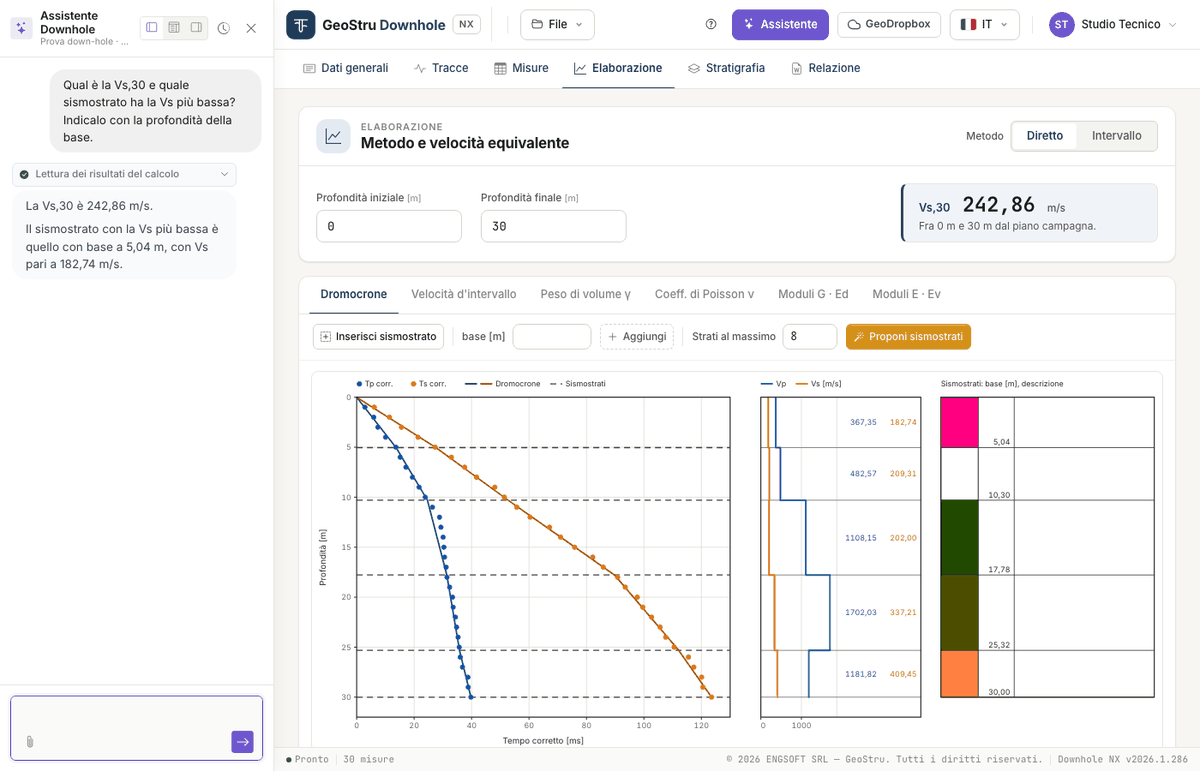
Above each answer, a label says what the assistant did on the project: for instance “Reading the calculation results” or “Calculating the arrival-time proposal”.
What it can do
Read and explain
- it reads general data, geometry, measurements, seismic layers and stratigraphy;
- it reads the results of the calculation as they are on screen and explains them: velocities, moduli, Vs,eq, the meaning of a warning or of a “--”;
- it checks the measurements: missing times, anomalous intervals, what is missing before generating the report;
- it explains the methods, the formulas and the limits of the test.
Write to the project
- it fills in the general data;
- it sets the geometry (source offset, first measurement, spacing);
- it enters the measurement table you give it, typed in the message or in an attached file;
- it sets the options: method, automatic or assigned unit weight, depths for Vs,eq;
- it adds, moves and describes the seismic layers of both methods;
- it fills in the stratigraphy.
Have times and seismic layers proposed
- it has the app calculate the arrival-time proposal on the uploaded traces, and lists the doubtful ones for you;
- it sends the picked times to the measurements;
- it has the app calculate the seismic-layer proposal.
These are the same proposals as the Propose the times and Propose seismic layers buttons: see Automatic proposals below.
When it writes, the numbers it reports are read back from the calculation: it does not redo them in its head.
What it does not do
- It deletes nothing: measurements, seismic layers and layers are removed by you, in their tabs. If needed, it tells you what to remove and where.
- It does not replace measurements or seismic layers you already have unless you ask for it explicitly.
- It does not upload traces and does not generate the report or the DXF: those are your actions.
- It does not make up measurements: only the values you give it, or that it reads from a document of yours, go into the table. If they are missing, it asks.
- It does not assign the subsoil category: it can explain the categories of the Italian code and in which range a Vs,eq falls, but the classification is left to the designer.
How to use it
Type your request in the box at the bottom and send it. When you first open the panel you also find the Quick actions, ready-made requests you send with one click.
Requests that work well are concrete and say which method or tab you mean:
- “Explain the results: velocities, moduli and Vs,eq”
- “Set the source offset to 2 m and compute Vs,eq between 1.5 and 30 m”
- “Enter these measurements” followed by the depth, Tp, Ts table copied from the spreadsheet
- “Add a seismic layer with its base at 8 m to the direct method and describe it as silty sand”
- “Check the measurements: any missing times or anomalous intervals?”
- “What is missing before generating the report?”
If the times are in seconds or the unit weight is in other units, say so: the assistant converts and states the conversion. If the request is ambiguous, it asks before writing.
Automatic proposals
With the traces uploaded, and a depth given to the rows, you can ask:
- “Propose the arrival times and tell me which ones are doubtful”
- “Send the times to the measurements”
- “Propose the direct-method seismic layers, four layers at most”
- “Process the survey: propose the times, send them to the measurements and propose the seismic layers”
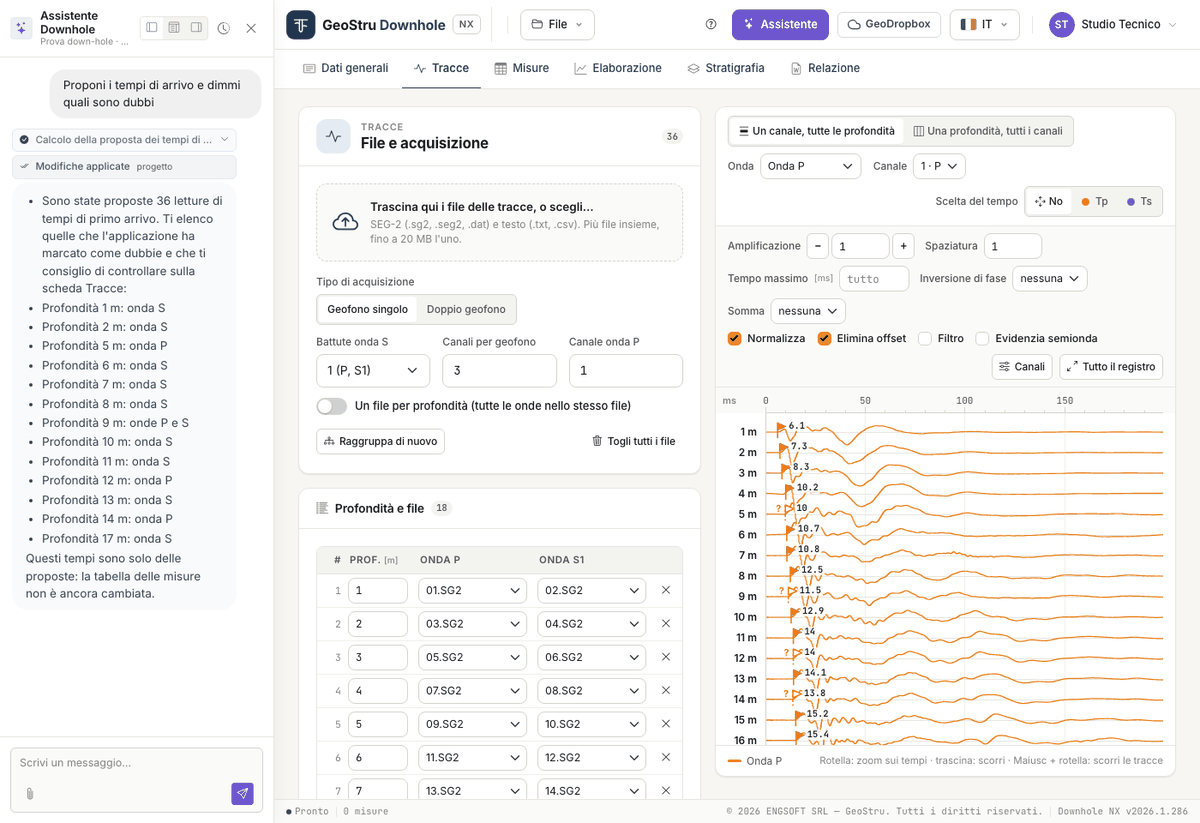
How it behaves:
- it presents times and seismic layers as proposals to be checked, lists the doubtful times and reports the warnings of the calculation;
- it goes one step at a time: after the times it may ask you to confirm before sending them to the measurements. That is the moment to check them on the traces;
- if the measurements already contain times, it does not replace them without an explicit request (“replace the measurements with the proposed times”);
- if the method already has seismic layers, it does not replace them without an explicit request (“propose the seismic layers again”, “replace the layers”);
- if you ask, it can suggest an indicative lithological description from the velocities: it states it as a hypothesis, to be compared with the borehole log.
Give it the source offset as well: without it, the calculation uses the one written in the Measurements tab.
Attaching a document
With the paperclip you attach a file: text, CSV or TSV, spreadsheet (.xlsx, .xls)
or PDF. It is useful, for instance, to have the measurement table filled in from a test
report. Always check what was written against the original.
While it works
While the assistant writes to the project the page is locked, and a strip says so: “The assistant is working on the project: the page becomes editable again as soon as it has finished”. Your own changes at that moment would be rejected, with no harm done.
Before sending the message the app saves the tab you have on screen; when the work is done the page reloads by itself with the updated project.
In one answer the assistant can carry out a limited number of operations: if it reaches the limit it says so, what it did is in the project, and you write to it to continue.
The panel
At the top of the panel: three buttons to dock it left, bottom or right, the history button to resume or reset the conversation, and the close button.
It is an artificial intelligence system
Check what it writes
The assistant's answers are generated by an artificial intelligence system and may contain errors. What it writes to the project is a proposal: measurements, seismic layers and descriptions must be checked. The processing is yours, and you sign it.
In particular: proposed times must be looked at again on the traces, starting with the doubtful ones; proposed seismic layers are the subdivision that best follows the times, not an interpretation; a lithology suggested from velocities alone is a hypothesis; a table read from a PDF must be compared with the document.
Support ticket
The Open a support ticket quick action opens a support request from the same chat. While the ticket is open, messages go to support, not to the project assistant, and use no credits.
A strip at the top of the panel tells you who is answering: an artificial intelligence assistant or, after the handover, a human operator. You can ask to talk to an operator at any time.
Found an error on this page? Let us know or open a Pull Request.