Report, DXF and credits
The Report tab produces the two deliverables of the test: the Word report and the DXF drawings of the charts. Together with messages to the assistant, these are the actions of the app that use credits.
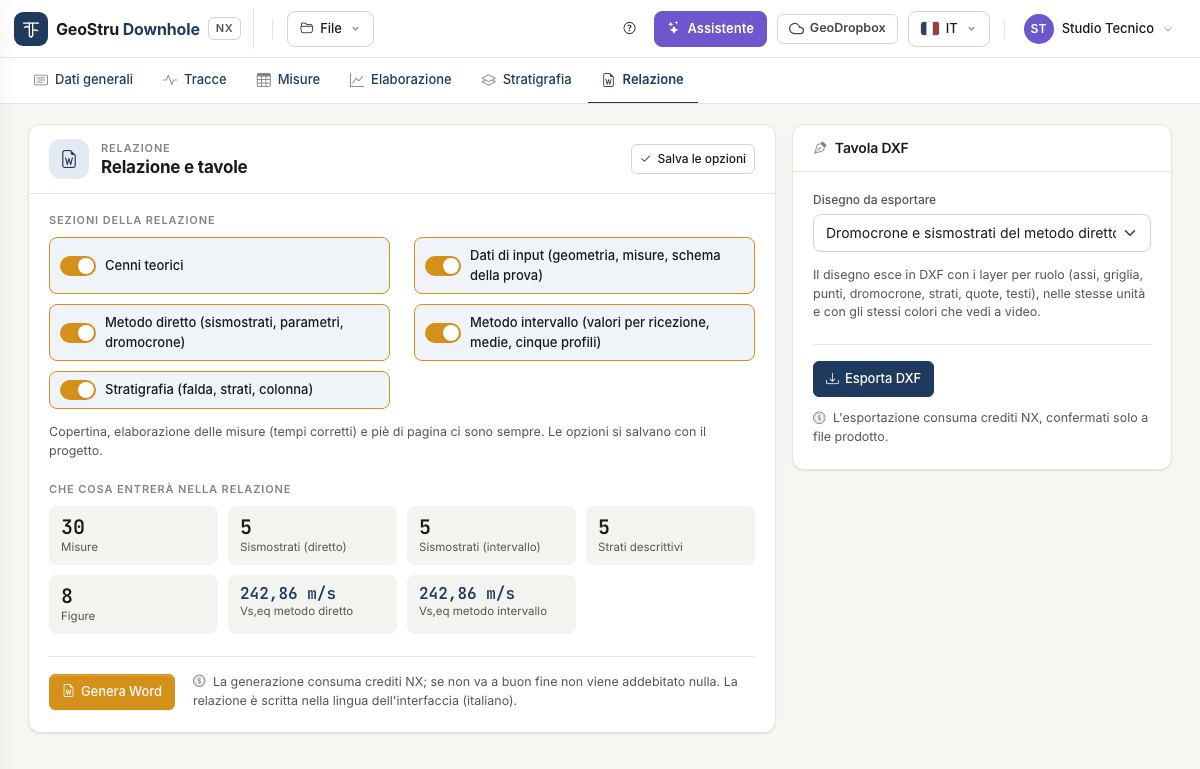
Before you generate
Check three things, all free:
- the fields of the General data tab (client, site, location, date, operator, person in charge, description, notes, coordinates): they appear on the cover page and in the footer;
- the seismic layers and Vs,eq in the Processing tab;
- the What the report will contain box: number of measurements, seismic layers of both methods, descriptive layers, figures and Vs,eq of both methods.
If the measurements are missing or contain errors, Generate Word is disabled and a note says what to fix.
Report sections
Five switches choose what to include.
| Section | Content |
|---|---|
| Theoretical notes | The test, the procedure, the two methods, the elastic parameters, Vs,eq, the limits and the references. |
| Input data | Geometry, table of measured times, test layout. |
| Direct method | Vs,eq, seismic layers, parameters per layer, travel-time curves. |
| Interval method | Vs,eq, parameters per measurement interval, seismic layers and average values, the five profiles (velocity, γ, ν, G·Ed, E·Ev). |
| Stratigraphy | Water table, layers and column. Included only if the Stratigraphy tab has at least one layer. |
Cover page, contents, processing of the measurements (the table of corrected times) and footer are always there.
The options are saved with the project: press Save options, or switch tab and the app saves them for you.
Generate Word
Generate Word produces a .docx file and the browser downloads it.
- The report is written in the interface language: to have it in English, switch language from the selector at the top before generating it.
- The figures are the same drawings you see on screen.
- On opening, Word may ask to update the fields: accept, and the table of contents gets its page numbers. Otherwise right-click the contents → Update field.
- Values that cannot be computed stay “--”, as on screen; the warnings of the calculation are reported in the document.
The document is an ordinary Word file: you can edit it, add your logo, convert it to PDF from your word processor.
DXF drawing
In the DXF drawing card choose the Drawing to export and press Export DXF:
- Test layout
- Travel-time curves and seismic layers of the direct method
- Interval velocity profile
- Interval unit weight profile
- Interval Poisson's ratio profile
- Interval G and Ed moduli profile
- Interval E and Ev moduli profile
- Stratigraphic column
Each export produces one drawing, with one layer per role (axes, grid, points, travel-time curves, layers, dimensions, texts), in the same units and colours you see on screen. Texts are in the interface language.
If the chosen drawing is empty (for instance the stratigraphic column with no layers), the app says so and exports nothing.
Credits
What uses them
| Action | When it is charged |
|---|---|
| Generate Word | Once the document has been produced. |
| Export DXF | Once the file has been produced. |
| Message to the assistant | When the answer arrives. |
What is free
Uploading traces, picking times, filling in the measurements, processing, inserting and moving seismic layers, viewing all charts and tables on screen, filling in the stratigraphy, saving and opening the project, opening the example.
How much they cost
This manual does not quote prices: they change with the price list, published on geostru.ai. Your balance is in the user menu, at the top right.
If the balance is not enough, the app generates nothing and shows a strip with the credits needed, the balance and the Buy credits button. The project stays in the session: top up and try again.
If something goes wrong
If an operation fails, nothing is charged. That holds for every case the app can run into:
- an error while generating the Word or the DXF file;
- invalid measurements or an empty drawing;
- expired session: the app says so and neither writes nor charges anything;
- credit service unreachable: try again in a few minutes;
- assistant not available, or answer not received.
The full conditions (validity of credits, refunds) are in the Terms of Service.
Found an error on this page? Let us know or open a Pull Request.