Traces and time picking
In the Traces tab you upload the recordings of the test, look at them and pick the first-arrival time of P waves (Tp) and S waves (Ts) at each depth: by hand, with a click on the trace, or starting from the times the app proposes. Send to measurements turns the picked times into the table of the Measurements tab.
If you already have the times you do not need this tab: go straight to Measurements.
The tab has two columns. On the left, three cards: Files and acquisition, Depths and files, Picked times. On the right, the trace view.
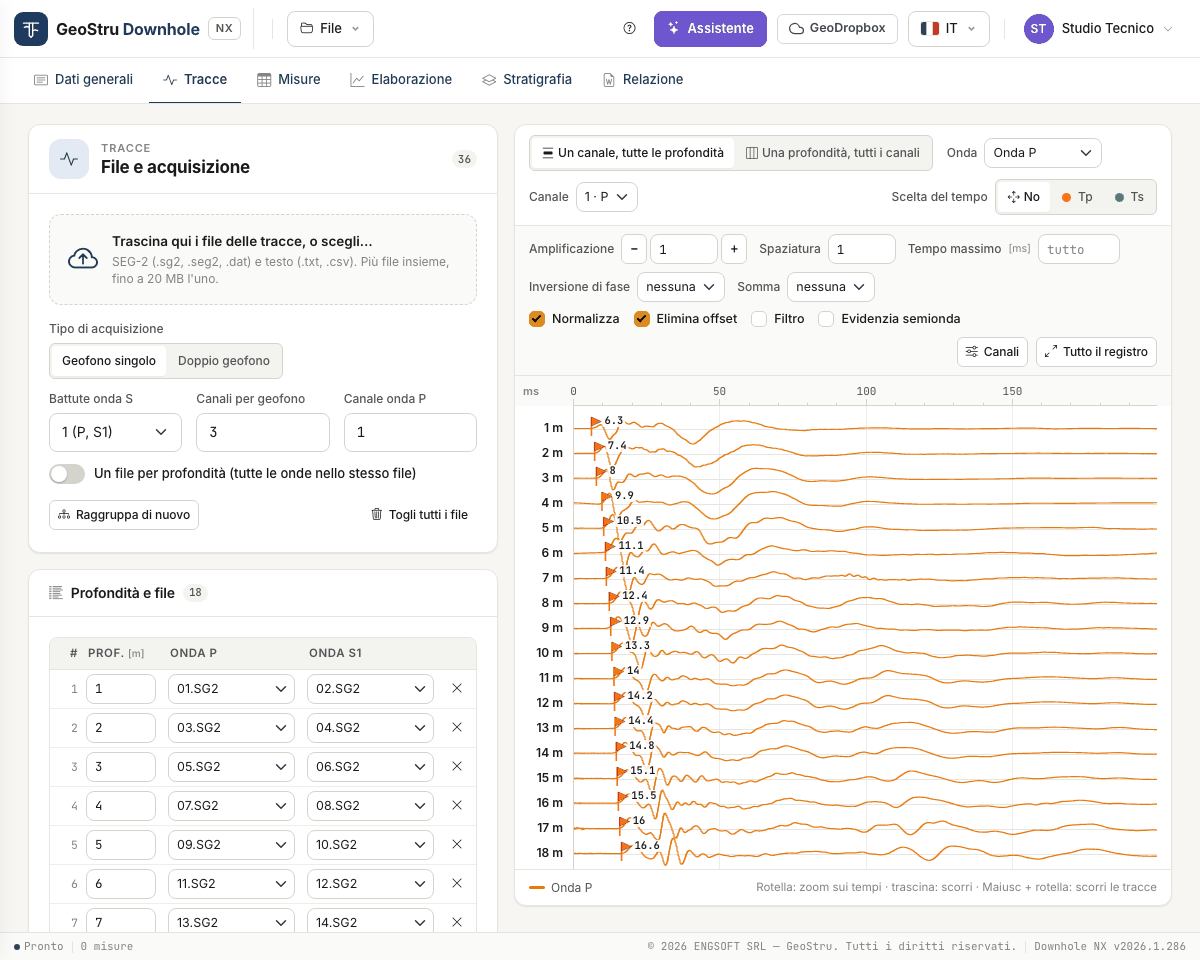
Uploading the files
Drop the files on the dashed box, or click it to browse. You can upload many at once.
| Format | Extensions |
|---|---|
| SEG-2 | .sg2, .seg2, .dat |
| Text, with the traces in columns | .txt, .csv |
Each file can be up to 20 MB; a project holds at most 600 files, 400 depth rows and 64 channels. During the upload a bar shows “n of m files”; at the end a strip sums up the outcome: how many files went in and, for the rejected ones, why.
Before uploading, set in the Files and acquisition card how the test was run:
| Field | What it means |
|---|---|
| Acquisition type | Single geophone or Double geophone (two probes in the same file). |
| S-wave shots | 1 (P, S1): one P shot and one S shot per depth. 2 (P, S1, S2): the two horizontal S shots in opposite directions. |
| Channels per geophone | How many channels one probe has. 0 = all the channels of the file. |
| P-wave channel | The channel on which the P wave is read (usually the vertical one). |
| One file per depth | Each file holds all the waves of one depth. |
Rows: one depth and its files
The Depths and files card has one row per depth, with the file of the P shot and those of the S shots.
Files are grouped automatically in name order (the number the name starts with is what
counts): in pairs with one S shot, in threes with two. With 36 files and S-wave shots = 1
you get 18 rows: 01 and 02 on the first, 03 and 04 on the second, and so on.
Then the depths are needed:
- type the depth of the first two rows;
- the rows that are still empty take the step between the two;
- Fill from the first two rewrites, with that step, every row from the third down.
With One file per depth and names such as 12 or 12m, the depth is read from the
name.
Every cell can be corrected by hand: retype the depth, change the file from the drop-down, remove the row with ×, add an empty one with Add row. Until a row has a depth, its traces are left out of the view.
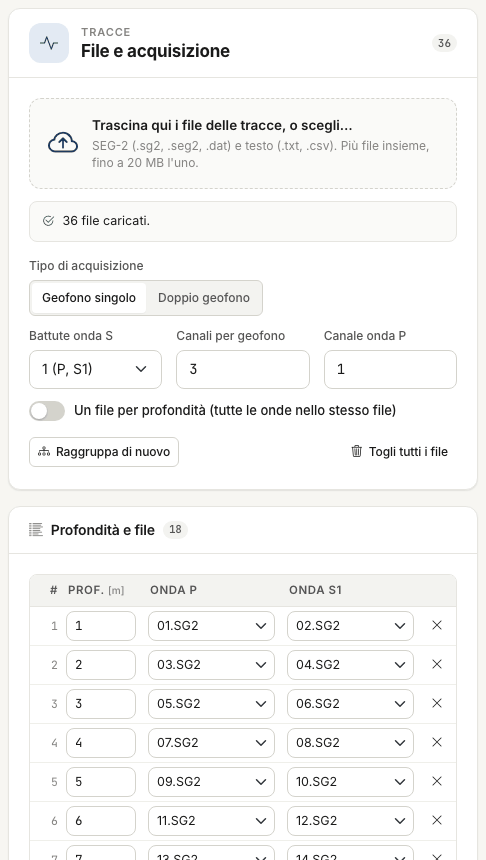
- Group again rebuilds the rows from all the uploaded files with the current options. It asks for confirmation: manual corrections are lost.
- Remove all files clears files and rows. The times already picked are kept.
- Uploaded files, at the bottom of the card, lists the files with number of traces, samples, sampling interval and duration.
The two views
At the top, above the plot, you choose how to look at the traces.
One channel, all depths — one trace per depth, top to bottom: the section along the borehole, where first arrivals can be followed from one depth to the next. Choose the Wave (P wave, S1 wave, S2 wave, S1 + S2 waves overlaid) and the Channel.
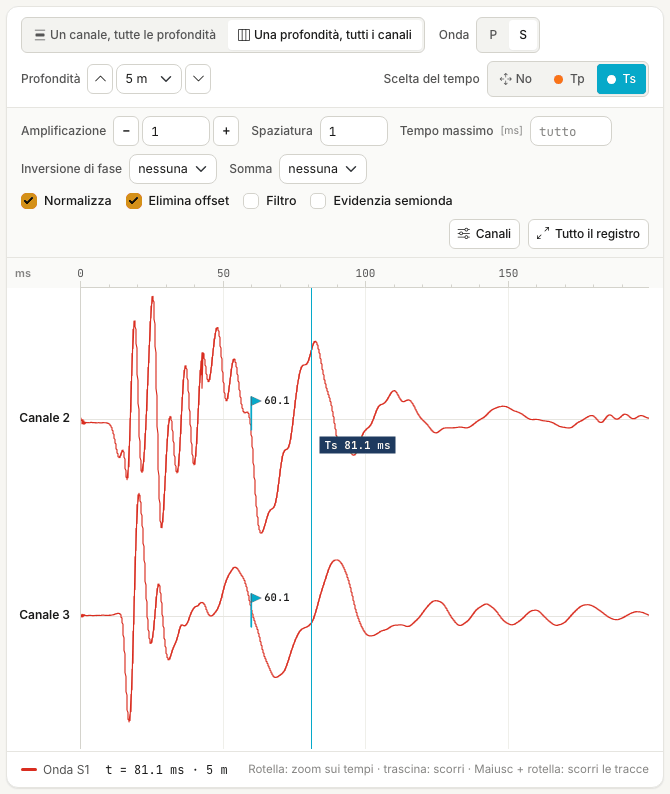
One depth, all channels — all the channels of a single depth. Choose P or S and the Depth, from the drop-down or with the up and down arrows. The S view shows the active channels other than the P-wave channel; with two S shots, S1 and S2 are overlaid on the same channel, and the polarity reversal helps you recognise the first arrival of the shear wave.
Display controls
They change the drawing only, never the data.
| Control | Effect |
|---|---|
| Gain | Trace amplification: type the value, or use − and + to step it down and up. |
| Spacing | Distance between traces. At 1 they all fit in the window. |
| Max time | Cuts the record at that time, in ms. Empty = all. |
| Phase inversion | Reverses the polarity of S1 or S2. |
| Sum | Shows S1 − S2 or S2 − S1 instead of the two traces. |
| Normalise | Each trace is scaled to its own maximum. Without it the scale is common and amplitudes can be compared. |
| Remove offset | Subtracts its mean from each trace. |
| Filter | 5-point moving average. |
| Highlight half-wave | Fills the negative lobe of the traces. |
| Channels | Opens the channel table (below). |
| Whole record | Resets zoom and pan. |
The latest options are kept in the project: when you reopen the tab the view is as you left it.
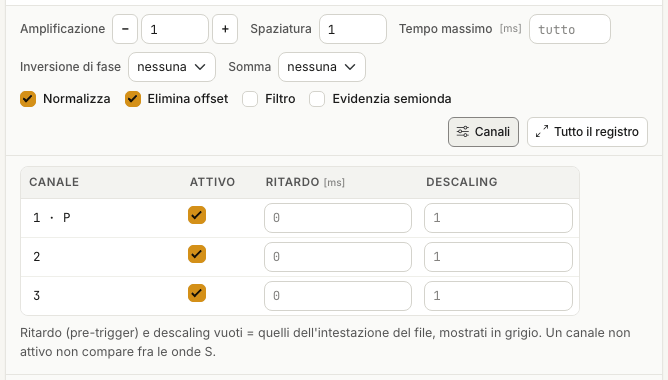
Channels: active, delay, descaling
Channels opens a table with one row per channel of the file. You can switch a channel off, or type a Delay (pre-trigger, in ms) and a Descaling different from those in the file header. Empty fields use the file values, shown in grey.
Picking the times
Picking by hand is the reference procedure: the times proposed by the app are checked, and corrected, in the same way.
- In Time picking press Tp or Ts. Choosing Tp brings the P wave on screen, choosing Ts the S waves.
- Click on the trace at the first arrival.
- The time goes to the depth of that trace (in the per-channel view) or to the depth on screen (in the per-depth view). A flag appears, orange for Tp and cyan for Ts, and the row of the Picked times card is updated.
A new click at the same depth replaces the time. Times have a resolution of 0.1 ms and must fall after the shot instant (t > 0).
With Off a click picks nothing: use it to pan and zoom safely.
Zoom and pan
On the whole record one pixel is worth a few tenths of a millisecond: zoom in to read the first arrival properly.
- Wheel: zooms the time axis around the pointer.
- Drag: pans in time. A drag is never a pick.
- Shift + wheel: scrolls the traces, when they do not all fit in the window.
- Whole record: back to the full view.
At the bottom left you always read the time and depth under the pointer.
The picked-times table
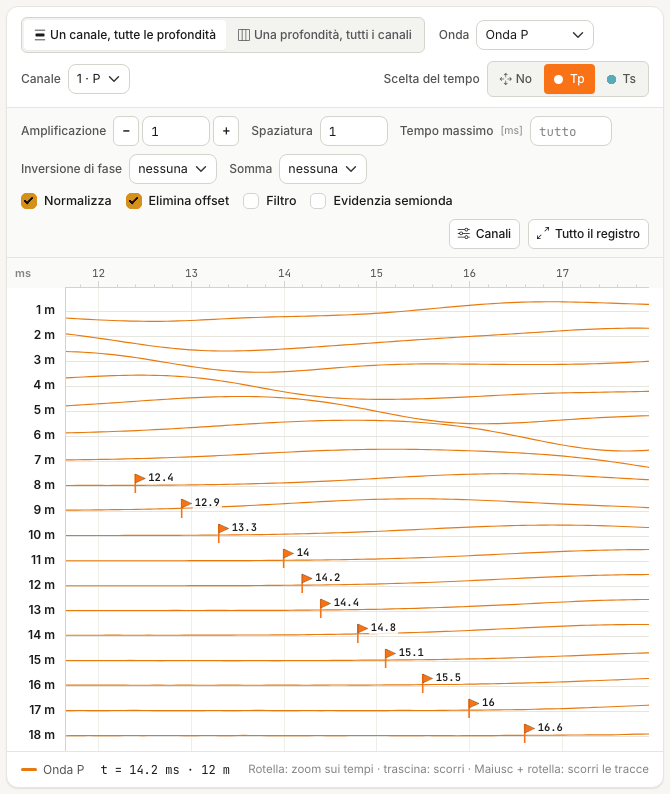
The Picked times card has one row per depth, with Tp and Ts in milliseconds. Values can also be typed or corrected by hand; × removes the times of that depth. If a depth no longer has a row in the Depths and files card, its time is kept but flagged: it has no trace.
Proposing the times
Propose the times, in the Picked times card, calculates a proposal of the first-arrival times at every depth of the uploaded traces. It is free, and takes a few seconds.
Next to the button you choose the waves: P and S, P only or S only.
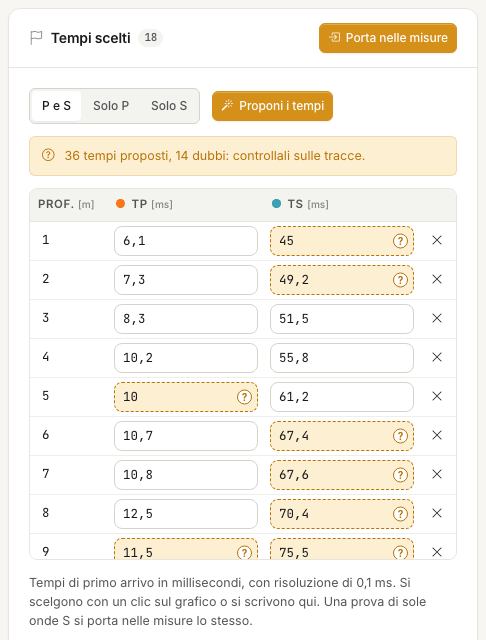
At the end a strip sums up the outcome, for instance “36 times proposed, 14 doubtful: check them on the traces”, and the flags appear on the traces just as for times picked by hand.
If there are times already
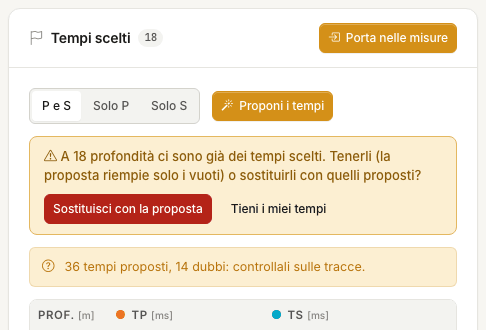
If you have already picked times at some depths, the app does not touch them without asking. A strip offers two ways:
- Keep my times — the proposal only fills the gaps;
- Replace with the proposal — your times are replaced by the proposed ones.
Doubtful times
The app marks as doubtful a proposed time that:
- deviates by more than 3 ms from the trend of the times at the neighbouring depths;
- does not increase with respect to the previous depth;
- falls on a trace with little signal compared with the noise.
A doubtful time shows in two places: in the table the cell is highlighted and carries a “?”; on the trace the flag is hollow, with a “?” next to it.
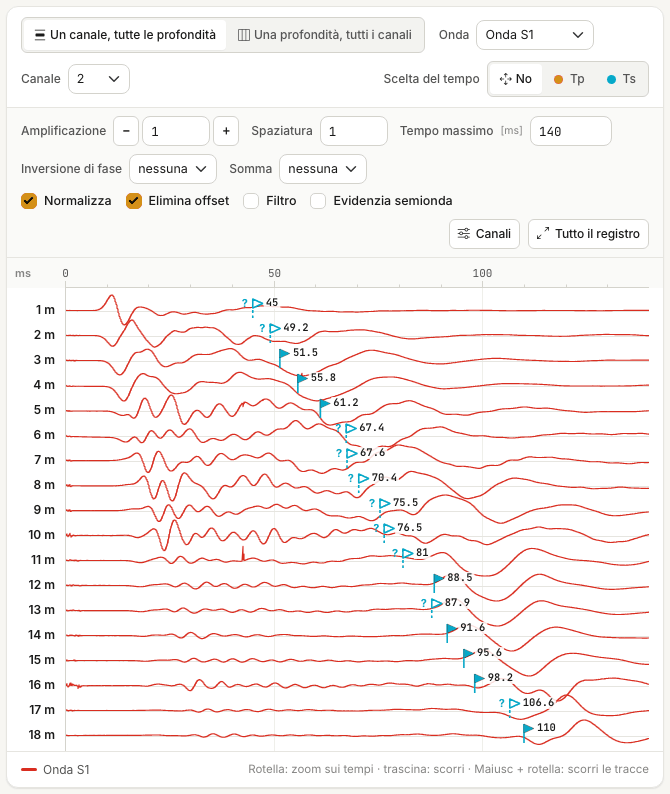
The mark disappears when you pick the time yourself: switch on Tp or Ts and click on the trace, even at the same point if the proposal convinces you, or type the corrected value in the table.
“Doubtful” does not mean wrong: it means to be looked at. And a time that is not marked is not right for that reason.
How far to trust it
On the survey used for the pictures on this page (18 depths), compared with the times the operator picked by hand:
- P waves — median deviation 0.3 ms, maximum 1.4 ms: the proposal matches the reading within the uncertainty of the reading itself;
- S waves — median deviation 1.4 ms, maximum 5.3 ms, on times of 40–110 ms; ten times out of eighteen are marked doubtful.
S waves are the hard case, for two reasons you meet in nearly every test:
- at the shallowest depths the shear wave is buried under the P-wave train;
- where the wavelet changes shape from one depth to the next, the first arrival can no longer be followed continuously.
Check the S proposals one by one
Switch to the One channel, all depths view, S wave, and look at every flag, starting with the hollow ones. With two S shots use the per-depth view as well: there the polarity reversal between S1 and S2 shows where the shear wave arrives.
Send to measurements does not tell doubtful times from the others: it sends them all, and in the measurements the mark is gone. Check first. P times that do not increase with depth later give, in Processing, the “Decreasing corrected time” warning and “--” rows.
When the proposal does not start
| Message | What to do |
|---|---|
| There are no traces to read… | Upload the files and give each row a depth. |
| n trace files are no longer on the server… | Drop the files again, then ask for the proposal. |
| The P-shot and S-shot files have a different number of channels… | Check the rows and Channels per geophone. |
| The time proposal did not work on these traces | Pick the times by hand. |
| No proposal at depths: … m | Pick the time by hand at those depths. |
In all these cases nothing is written.
Double geophone
With Double geophone each file holds the recordings of two probes. The first N channels (N = Channels per geophone) belong to the upper probe, at the depth of the row; the next N to the lower probe, one position further down (the step between the first and the second row). In the view each trace is labelled “upper probe” or “lower probe”.
If a file has fewer channels than expected (channels per geophone × 2), the tab says so.
Text files
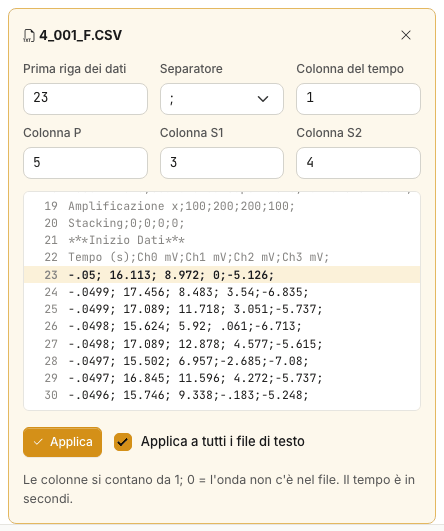
For a .txt or .csv file the app has to know where the data start and which columns to
read. When the first text file is uploaded, the Text reading options panel opens by
itself, with the values the app has recognised and a preview of the file: check them.
| Field | Meaning |
|---|---|
| First data row | The first row with numbers, after the header. It is highlighted in the preview. |
| Separator | ;, , or tab. |
| Time column | In seconds. |
| P column, S1 column, S2 column | Columns are counted from 1; 0 = the wave is not in the file. |
Apply reads the file again; with Apply to all text files the same options hold for all of them. To reopen the panel of a file, use the button next to its name in the Uploaded files list.
Sending the times to the measurements
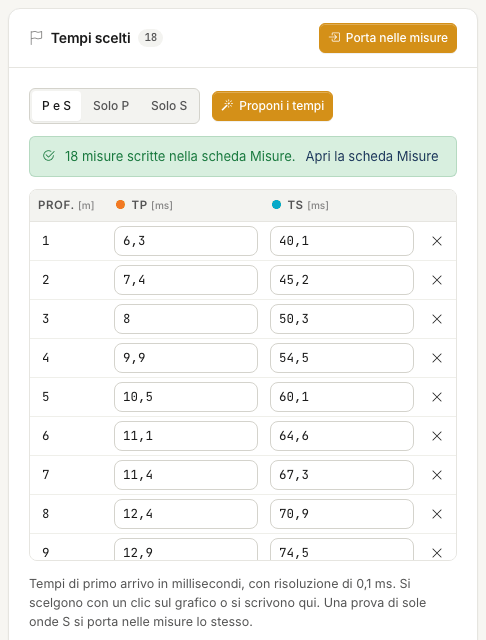
When you have picked the times, press Send to measurements in the Picked times card.
- The times go to the table of the Measurements tab, sorted by depth, in milliseconds.
- The measurement table is replaced: if it already has rows with times, the app asks for confirmation.
- One wave is enough: an S-only survey is sent as well, and the other column stays at zero, that is “not measured”.
- Non-positive or duplicate depths cannot be measurements: they are left out, and the tab lists them.
Then check the geometry
Send to measurements writes depths and times, not the geometry. Open the Measurements tab and set the Source offset: without the real value the corrected times are wrong.
Warnings in this tab
| Warning | What to do |
|---|---|
| n rows have no depth: they are left out of the views | Type the depth of the rows. |
| Several rows share the same depth: the per-depth view shows the first one | Fix the duplicate depth. |
| The P-shot and S-shot files have a different number of channels | Channels are read by number: check P-wave channel and Channels per geophone. The app does not merge P and S files with different numbers of channels. |
| The file has n channels: the double geophone needs m | Check Channels per geophone or the acquisition type. |
| n files are no longer on the server: upload them again | Drop the same files once more: they are reattached to their rows, with no new rows. |
| The traces take … MB, more than the … MB that fit in the .dhnx file | Save will write only the references to the traces. See Files. |
| Unsupported SEG-2 data format | The file uses a sample encoding the app does not read. See the FAQ. |
Found an error on this page? Let us know or open a Pull Request.