MDC NX
MDC NX is the GeoStru web app for the design and verification of retaining walls to NTC 2018 and the Eurocodes. It is the port of the MDC desktop program: same calculation phases, same results where the desktop is right, declared corrections where it is not (see Validation and limits).
You describe the wall section, the soil, the water table and the loads; the app generates the load combinations of the code, computes the earth pressures, runs the global and structural checks, designs the reinforcement and prepares the report. The calculation runs on the server and restarts at every change; in the browser you see the section, the diagrams and the checks.
What it does
- Earth pressures on the stem and on the virtual back: active (Coulomb/Müller-Breslau or Rankine) or at rest, seismic (Mononobe-Okabe), on layered soil with water table, ground profile in segments, distributed surcharges and point loads.
- Global checks for every combination: sliding on the founding plane, overturning, bearing capacity (Vesic or Brinch Hansen), ground pressures under the foundation.
- Pseudo-static seismic action to NTC 2018: site parameters from the coordinates, kh and kv for retaining walls, inertia forces.
- RC sections of stem, toe, heel and shear key: ULS bending with axial force and shear, SLS stresses and cracking (or allowable stresses).
- Reinforcement designed on the envelope of the combinations, with bar schedule and weights.
- Piles (one, two, three rows or free rows) and ground anchors, with the distribution of actions and the checks of every row and every anchor.
- Word report with the "Calculation code" block and a code that can be verified online, section in DXF,
.mdcnxproject.
Wall types
| Type | What changes |
|---|---|
| RC cantilever wall | the base case: stem, toe and heel; shear key, back shelf, front shelf and blinding concrete optional |
| Gravity wall | no reinforcement; the stresses in the wall body are checked |
| Wall on piles | the foundation actions go to the piles under a rigid cap; every row is checked |
| Anchored wall | one or more ground anchors on the stem, each one checked |
Counterfort and gabion walls, seismic displacements, seismic capacity and global stability are coming with the second release. A desktop project that contains them opens and keeps them, but does not compute them.
The page
Everything is on one page: on the left the 12 steps of the project and, below them, the active step; in the centre the live wall section, with the views Section, Thrusts, Foundation pressures, Internal forces and Reinforcement; on the right the Checks panel. There are no pop-up windows: confirmations and messages are strips in the page, data errors appear next to the field.
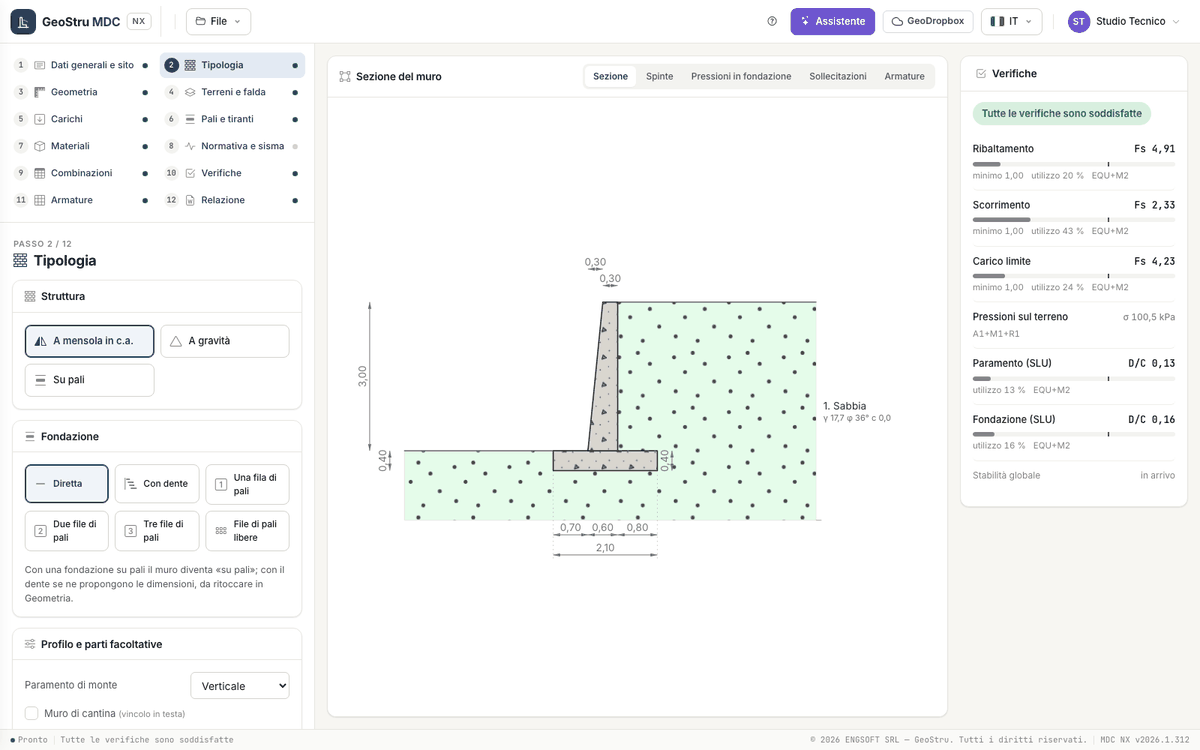
The dot next to each step tells whether it is complete or something is missing.
| Step | What you do |
|---|---|
| 1 · General data and site | description, client, site, site location, engineering firm |
| 2 · Wall type | structure, foundation, back face profile, optional parts, guided setup |
| 3 · Geometry | stem, toe and heel, slopes, shear key, shelves, blinding |
| 4 · Soils and water table | layers, water table, ground profile, backfills |
| 5 · Loads | distributed surcharges on the backfill and point loads |
| 6 · Piles and anchors | piles (only with a piled foundation) and ground anchors |
| 7 · Materials | concrete, steel, factors, covers, gravity wall |
| 8 · Code and seismic action | code, earth pressure and bearing capacity options, seismic parameters, kh and kv |
| 9 · Load combinations | combinations generated from the code or customised |
| 10 · Checks | safety factors per combination, partial factors, check × combination summary |
| 11 · Reinforcement | computed reinforcement, bar schedule, design data for the bars |
| 12 · Report | free preview, Word and DXF for credits |
Start with the Quick start. Before using the results in a project, read Validation and limits.
Found an error on this page? Let us know or open a Pull Request.