Files, desktop projects and GeoDropbox
The File menu at the top left collects opening, saving and examples.
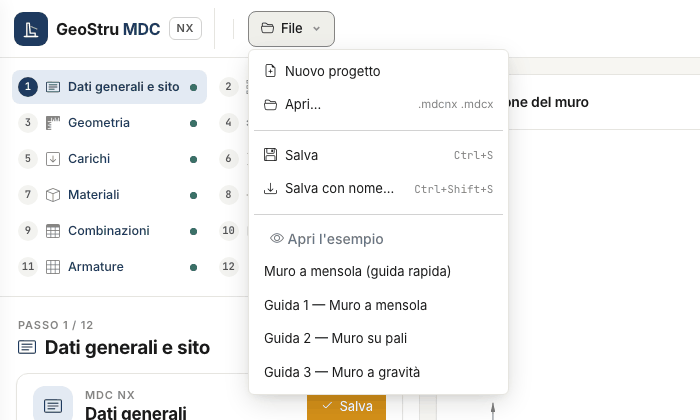
| Item | What it does |
|---|---|
| New project | empties the project; the wall is then created with the guided setup of the Wall type step |
| Open… | opens an MDC NX .mdcnx file or a desktop .mdcx file |
| Save (Ctrl+S) | rewrites the open file; if there is none, asks where to save |
| Save as… (Ctrl+Shift+S) | saves the project in a new .mdcnx file |
| Open the example | Cantilever wall (quick guide), Guide 1 — Cantilever wall, Guide 2 — Wall on piles, Guide 3 — Gravity wall |
New project, Open and the examples replace the open project: if there are unsaved changes, a strip below the bar offers Save first, Continue without saving or Cancel. Next to the menu appears the name of the file that "Save" writes to, when the browser can rewrite it.
The .mdcnx file
The project lives on the server while you work and expires after a period of inactivity: save it. The .mdcnx file is JSON in SI units and
contains only the input data: the results are computed again on opening.
Desktop projects
File → Open… also accepts the .mdcx projects of MDC desktop. The app reads wall type, geometry, profile, layers, water table, loads,
materials, combinations, seismic parameters, piles and anchors, converts the desktop units (cm, t/m², kg/cm²) into SI and recalculates
everything.
After opening, the active step shows a strip: "Desktop project opened: check the data before calculating", with the Import notes to expand. What to expect:
- the code of the file stays: if the first release does not compute it (D.M. 1996, OPCM 3274, foreign codes) the app shows a warning in the Code and seismic action step;
- the combinations of the file stay and are customised; Back to the code replaces them with the generated ones;
- gabions, stone masonry and counterforts are kept but not computed: they come with the second release;
- reinforcement assigned by hand in the desktop: kept in the file, but the calculation always designs the reinforcement;
- results stored in the file: not used, because they may come from an older version or from different data.
Results may differ from the desktop where MDC NX corrects a defect of the program: the list is in Validation and limits.
GeoDropbox
The GeoDropbox button in the top bar saves the project (.mdcnx) into a GeoDropbox project, also a new one, or opens a .mdcnx or
.mdcx file stored there. The project in the cloud is available from any workstation and can be shared with your office.
Examples
The examples load a complete wall, useful to see all views without typing data: Guide 1 is a 3 m cantilever wall on sand, Guide 2 a wall on two rows of piles, Guide 3 a gravity wall. Their numbers are those of the test cases of the validation.
Found an error on this page? Let us know or open a Pull Request.