Sections and reinforcement¶
With the FEM analysis enabled, Calculate checks the circular reinforced-concrete section at every node of the model, for each combination, and designs bars and stirrups where needed. The results are in the Sections and reinforcement tab, together with the cage shop drawing and the bar schedule.
The input data are in the Materials and reinforcement card: concrete class, steel, Longitudinal bars (min.), Bar diameter, Stirrup diameter and Cover. See Materials.
Node-by-node ULS check¶
At each node the program takes Nd, Md and Td from the FEM and computes:
- in bending with axial force, the resisting moment Mu of the N-M domain at N = Nd, and the safety measure FSM = Mu/Md;
- in shear, the resistances Vrcd (compressed strut) and Vrwd (transverse reinforcement), with the strut inclination θ, and FSV = Tu/Td.
The N-M domain is obtained by strip integration of the circular section, with the parabola-rectangle law for concrete (εcu = 3.5 ‰) and an elastic-plastic law for steel. In both checks the node passes with FS ≥ 1.
The structural code¶
The Design code (STRU) field, in General data, has three options:
| Option | Resisting moment |
|---|---|
| NTC 2018 (non-dissipative seismic) | at first yield of the steel (NTC 2018 § 7.4.4.5) |
| NTC (ultimate) | at failure, εsu = 10 ‰ |
| EC2 | at failure to EN 1992-1-1, εud = 0.9·εuk |
Shear follows NTC 2018 § 4.1.2.3.5 or EN 1992-1-1 § 6.2.
The first-yield moment is lower: it is intended
With NTC 2018 (non-dissipative seismic) the section must remain substantially elastic, so Mu is the first-yield moment. For a Ø 80 cm pile with 12 Ø 20 and C25/30 it is 315 kNm, against 455 kNm at failure. If you compare the result with non-dimensional design charts, which are at failure, choose NTC (ultimate).
Semi-design¶
If a node does not pass, the program increases the number of bars, up to the geometric limit of the section, and reduces the stirrup spacing. Bars and spacing may therefore change from node to node. The number you enter in Longitudinal bars (min.) is the starting point, not a constraint.
Reading the tab¶
The outcome at the top says Sections verified at all nodes or Section NOT verified at one or more nodes, with the reinforcement and the computed My; if a manual value entered Broms, it is shown next to it. Choose the combination from the drop-down.
- N-M interaction domain: the resistance domain with the point (Nd, Md) of the chosen node. Change node from the drop-down of the card.
- Cage shop drawing and Bar schedule, described further down.
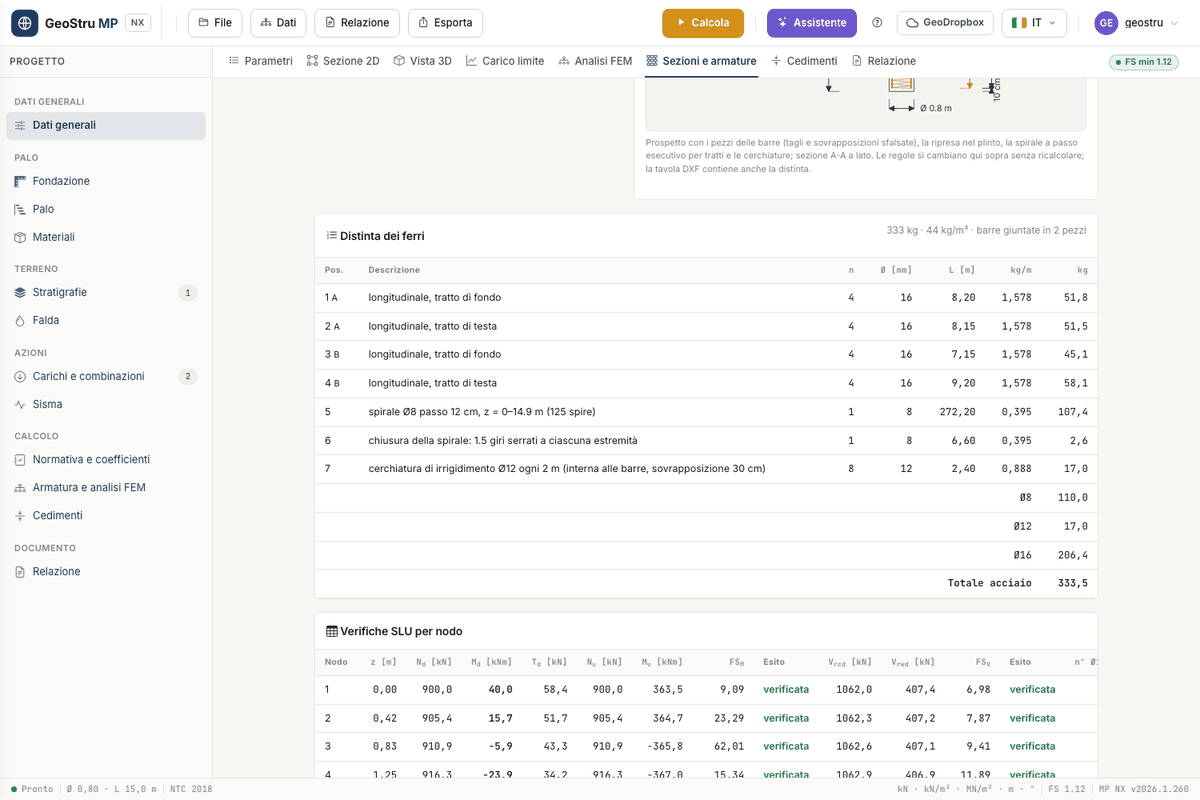
- ULS checks per node: elevation z, Nd, Md, Td, Nu, Mu, FSM with the result, Vrcd, Vrwd, FSV with the result, number of bars, Stirrup spacing, neutral axis yn, strains εc and εs, strut inclination θ.
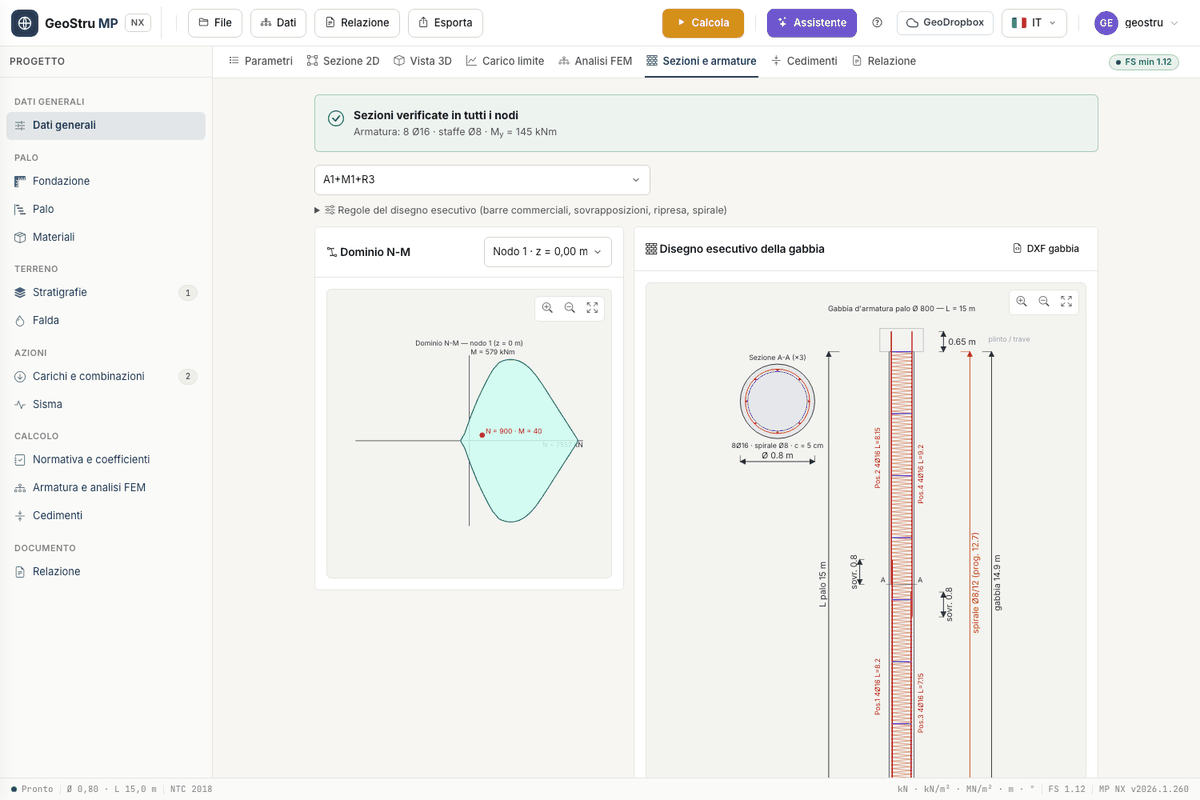
Cage shop drawing¶
The check tells how many bars and what spacing are needed at each node. The Cage shop drawing turns that result into the cage to be built:
- the longitudinal bars are the maximum over the nodes, cut into pieces within the stock bar length;
- splices are lapped and staggered between two groups of bars, so that they do not all fall on the same section;
- the bars continue above the pile head as starter bars into the cap;
- the transverse reinforcement is a continuous spiral or closed circular ties, in segments of constant pitch, with the design pitch rounded down;
- the stiffening rings keep the cage in shape during lifting.
The drawing shows the elevation with the pieces and section A-A beside it; wheel and drag zoom and pan.
The rules¶
Open Shop-drawing rules above the drawings:
| Rule | Default |
|---|---|
| Stock bar length | 12 m |
| Lap length ls | 50 Ø (minimum 20 Ø) |
| Starter bars into the cap | 40 Ø (0 = none) |
| Cage bottom above the toe | 0.10 m |
| Transverse reinforcement | Continuous spiral |
| Pitch rounding (down) | 0.01 m |
| Stiffening rings Ø | 12 mm (0 = none) |
| Ring spacing | 2 m |
The rules are saved in the project and do not affect the calculation. When you change one, cage and bar schedule are redrawn from the result already computed: no recalculation is needed and no credits are charged.
Bar schedule¶
The Bar schedule card lists the bar marks: description, number, diameter, length, weight per metre and weight, with subtotals per diameter and the Total steel. The header shows the total weight, the steel ratio in kg/m³ and how many pieces the bars are spliced in. The weight per metre is 0.006165·Ø² kg/m, with Ø in mm.
The Cage DXF button exports the shop drawing with the bar schedule; the full DXF drawing (Export menu) and the report also carry the schedule. Both DXF files cost the export credit.
What is not covered¶
- Non-circular sections: the ULS check is for the circular section only.
- Composite tube + grout section of the tubular micropile: the node-by-node check is not available. See Micropiles.
- Lattice reinforcement and serviceability checks (cracking, stresses) are not part of MP NX.
Found an error on this page? Let us know or open a Pull Request.