Stratigraphies and water table
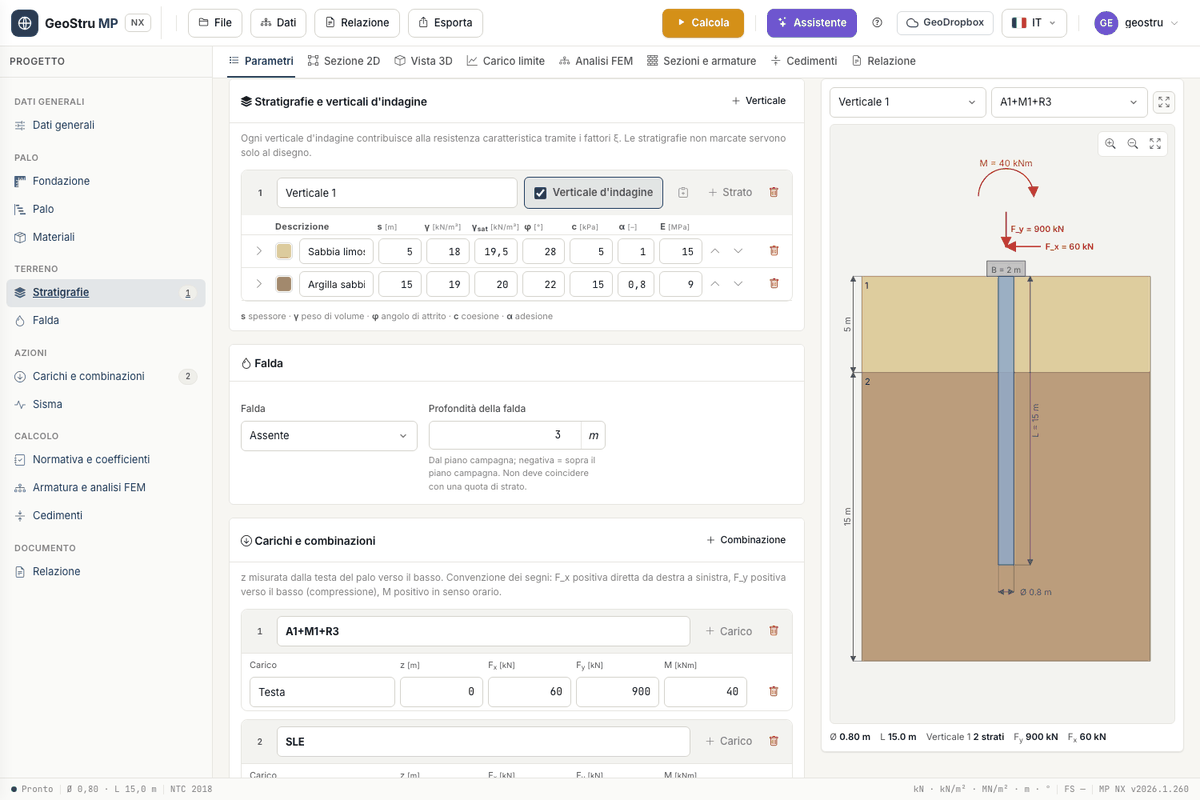
The ground is described in the Stratigraphies and investigation verticals card; the water table has its own card. The surcharge at ground level qpc is in the Pile card.
Investigation verticals
Each stratigraphy is a vertical: a borehole, a test, a design profile. The Vertical button adds as many as you need.
The Investigation vertical box decides whether the stratigraphy enters the calculation. For each marked vertical the program computes the ultimate load; the number n of verticals sets the correlation factors ξ3 and ξ4, and the characteristic resistance is Rk = min(Qmean/ξ3, Qmin/ξ4). Unmarked stratigraphies are used for the drawing only.
If no stratigraphy is marked, the program uses the first one and says so in the messages.
Layer parameters
Each row is a layer, from top to bottom. The arrows move the row, then come Duplicate and Delete; the small coloured square picks the colour in the drawing.
| Column | Meaning | Unit |
|---|---|---|
| s | thickness | m |
| γ | unit weight | kN/m³ |
| γsat | saturated unit weight, used below the water table | kN/m³ |
| φ | friction angle | ° |
| c | effective cohesion c′ | kPa |
| α | adhesion: multiplies the cohesion in the shaft resistance (α·c) | – |
| E | elastic modulus of the soil, used by the Poulos and Davis settlement | MPa |
The arrow at the start of the row opens the Layer properties: Poisson's ratio ν and the oedometric modulus Eed (needed by the Chiarugi-Maia subgrade modulus in the FEM), the undrained shear strength cu, the rock strength Rc and RQD, and three boxes.
Undrained condition
With Undrained condition the layer is computed with φ = 0, c = cu and the saturated unit weight. At the base Nq = 1 and Nc is that of the chosen method for φ = 0 (9 with Berezantsev); along the shaft the resistance is α·cu.
c′ and cu are two separate fields. Column c is the effective cohesion, used in the drained condition; cu sits in the layer properties and is enabled by the box. So one layer keeps both values and you can switch between conditions without retyping them.
Files saved before September 2026
In an undrained layer with cu = 0 the program uses the value of column c. This serves projects saved when there was a single field, which would otherwise change their results on their own. In new projects enter cu in its own field.
Rock layer
Rock layer enables Rc (uniaxial compressive strength, in MPa) and RQD (in %). The frictional term is cancelled and the shaft resistance is τ = α·Rcᵏ, with the exponent k entered in the Code and partial factors card (field k rock). When the toe is in rock, Qp = A·Rc·ksq·dr, with dr a depth factor and ksq from the RQD:
| RQD [%] | > 90 | 75–90 | 50–75 | 25–50 | ≤ 25 |
|---|---|---|---|---|---|
| ksq | 1.00 | 0.75 | 0.30 | 0.10 | 0.05 |
Negative skin friction
With Negative skin friction the layer drags the pile downwards: it does not contribute to the shaft resistance and its adhesion is subtracted from the net ultimate load. In the Ultimate load tab the subtracted value is shown in brackets next to Q.
Water table
In the Water table card choose Present and enter the Water table depth from ground level. Below the water table the program uses γ′ = γsat − γw: if γsat is missing in a submerged layer, the calculation stops with a message.
A negative depth puts the water level above ground level: all layers are submerged and the water column γw·|z| is added to the stress. This is the case of piles in a river bed or at a quay; the "Pile immersed" example shows it with 2 m of water.
Water table on a layer boundary
The water table depth must not coincide with the boundary between two layers: the calculation stops. Move the water table by a centimetre or split the layer.
Surcharge
qpc, in the Pile card, is a uniform surcharge at ground level, in kN/m². It adds to the effective vertical stress at the toe, σ′v, on which the base resistance depends.
Paste layers
If you have the stratigraphy in a spreadsheet, use the clipboard button in the header of the vertical. The Paste layers window opens: paste the copied rows, one per layer, with the columns in this order.
Columns may be separated by tab, semicolon or comma; decimals may use a comma. The description is optional and missing columns keep the values of the first row. The window shows the Rows detected before you confirm, and you choose whether to append to or replace the existing layers. Properties not in the list (cu, Rc, RQD, boxes) are then completed by hand.
Found an error on this page? Let us know or open a Pull Request.